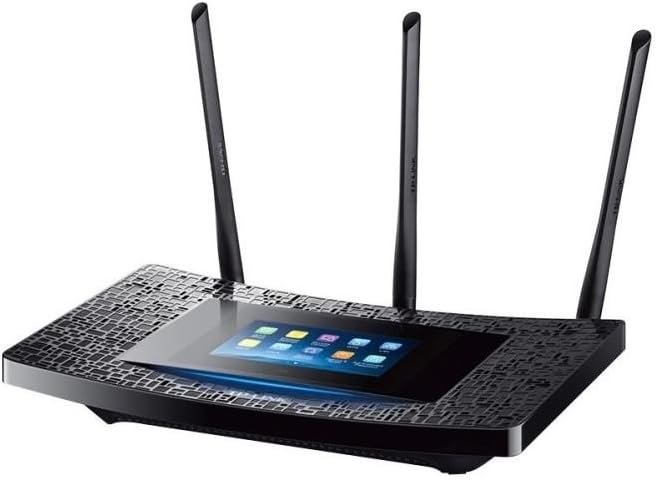
Struggling with weak Wi-Fi signals in certain rooms of your home? The TP-Link AC1900 Desktop Wi-Fi Range Extender with Touchscreen Interface is designed to eliminate those frustrating dead zones and provide reliable internet connectivity throughout your living space.
Setting up your Wi-Fi extender has never been easier thanks to the RE590T's intuitive touchscreen interface. No more digging through complicated menus on your computer or phone—simply tap the easy-to-understand icons to adjust your Wi-Fi settings, change network names, or manage guest access. The responsive touchscreen provides instant feedback, making network management feel natural and straightforward.
Experience internet speeds that keep up with your digital lifestyle. With AC1900 Wi-Fi speeds up to 1900Mbps, this extender delivers both 5GHz and 2.4GHz bands to handle everything from 4K streaming and online gaming to video calls and file transfers. The dual-band technology automatically selects the best frequency band for your devices, ensuring optimal performance whether you're downloading large files or browsing the web.
For devices that demand stable, wired connections like smart TVs, game consoles, and streaming players, the RE590T offers four Gigabit Ethernet ports. These high-speed ports provide a direct, interference-free connection to your home network, eliminating buffering and lag during your favorite shows or intense gaming sessions. Simply plug in and enjoy consistent performance without worrying about wireless signal strength.
Beamforming technology is the secret behind the RE590T's exceptional coverage. Unlike traditional extenders that broadcast Wi-Fi in all directions, beamforming focuses the signal directly toward your connected devices. This targeted approach strengthens connections, reduces interference, and extends your network's reach into previously unreachable corners of your home.
Need to adjust your settings while you're away? The TP-Link Tether app allows you to access and control your Wi-Fi extender from anywhere using your smartphone or tablet. Whether you want to check connected devices, change network settings, or restart the extender, remote management puts you in control of your home network from the palm of your hand.